This has been a long time coming for me, and this will be probably the last I mention of Cloudflare for a very long time. This post will detail my reasons for leaving, what it took to get here, and what is changing with this website as a whole. It's been a drain on me for a very long time, since the way I wanted to do things was very particular, but I am comfortable at this stage taking off.
This post will be a mix of technical knowledge content and my mental struggles to get here.
Months Ago
Some time around the beginning of the year, I became less thrilled with Cloudflare as a product. It's a little too big for my liking, and the only other option is to inherit all of Cloudflare's features as inconveniences. No more Tunnels, which provide free gateway links to your backend hardware. No more streamlined DNS management portal, you now manage DNS through your domain provider. No analytics for free, you will now need to rely on an external tool like Prometheus or Grafana. Cloudflare does a very good job at simplifying things to make it so you don't to chase down two or three different tools or processes to do something.
That in part is what makes Cloudflare objectively very hard to leave for many. What they give is some pretty massive protection like "free" DDoS protection for sites getting blown up by random botnet attacks or AI scrapers. But DDoS protection only works if Cloudflare isn't blackmailing customers by keeping attackers on their network. It took a pretty long time for Cloudflare to kick KiwiFarms off their network as well. Trying to be neutral means supporting both good actors and bad actors, whoever is willing to pay more, and Cloudflare loves to be paid. Cloudflare simply cannot be neutral in favor of money for the good of the internet.
So if I wanted to host my own website, what's that going to look like? How do I make it private? How do I protect my data as best as possible? How do I threat model what worst-case scenarios would even look like for me? The thoughts of leaving Cloudflare and entering a less-secure environment is scary. But, people have been administrating the internet before Cloudflare, and probably will long after. I'm not saying the things we have for free are better than Cloudflare, but I think it's important we find a path forward without Cloudflare to make things better for everyone.
Creating a VPN
What do I want, exactly? I have hardware at home to serve the purpose of trying to pay less for my internet data. Sure I don't get automated things like managed backups or such, but by keeping my data here, I run far less risks of things going way beyond my reach into places I can no longer stop it. I am not going to store everything online, but rather only the things I think would be an advantage to have reachable from anywhere on the internet.
I am also someone who wants to have an identity on the web. I am a technological person, and I believe my prospective employers deserve a chance to get a glimpse into who I am. I have been writing code for twenty-something years, even if it most of it is lost due to time or lack of interest, I think it's important for a programmer to manage their code. In my case, I want to host my code on my hardware on a domain I control, for example. I'd also like to be able to reach photo albums online via something like Immich. Perhaps I'd also like to be able to reach a text editor like OpenCloud for document work on the go.
All signs point to creating a virtual private network, and the way it's looking, most likely with Wireguard kernel-level routing. Only problem is, I'm totally ignorant at setting this stuff up myself. Never done it, never had a reason to, and Wireguard is still pretty new all things considered. But, I'm someone who's supposed to be able to figure things out, and this is the place to start.
So far my running theory is that I can spin up a public compute node, make it into a Wireguard entry node, and connect my backend devices to it. Once my backend is hooked up, any clients connecting to the primary node can join in and then start talking to my backend infrastructure. I can give them IP addresses and worry less about exposing my home IP address being used as a public IP online. The VPN effectively hides that detail away by using a public node to perform all the trust, and a side benefit is I can also use it as a normal internet VPN traffic node as well for when I don't feel like exposing my home IP to any websites.
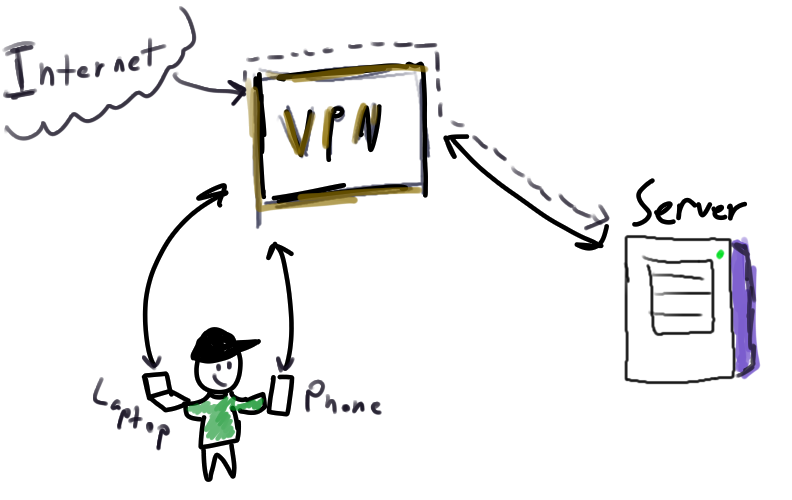
So all I had to do is figure out how to manage a VPN and all of its allowed clients, not a big deal, right?
Guix the VPN
I decided to pick a random compute provider, specifically Upcloud, shoutouts to them (not sponsored), and decided to toy around with the VPSes they rent out. I went with the cheapest $3.50/mo option they had. I don't need a high-compute node with a ton of memory or space. In fact, I don't really want that at all. I don't want to store sensitive information on a cloud provider. I am not someone who actively uses LUKS to encrypt things since it involves some extra steps to be able to boot a system, though one day I hope maybe I can figure something out there.
Realistically, the VPN shouldn't be holding anything other than program configurations. Clients connect to it, but my personal data should really not be living on a random VPS disk anyways. I am banking on a LUKS-less setup here since I don't quite know how to trigger a secure boot from a VPS provider. I felt this area would make a good exercise for Guix to be able to boot an operating system from a declarative schematic, pulling in only the bare minimum and having it be managed through remote upgrades by me building the packages. The VPS has low memory, so in no shape or form would it make sense to even try to do an OS upgrade from it.
For those already familiar with Guix, the basics are all there. The difficult stuff is... Well, everything else. Take this very simple configuration loosely transcribed.
(operating-system
  (host-name "vpn")
  (timezone "America/New_York")
  (locale "en_US.utf8")
  (users (user-account (name "me") (group "users")))
  (packages %base-packages)
  (services %base-services)
  (bootloader
   (bootloader-configuration
    (bootloader grub-bootloader)
    (targets '("/dev/vda"))))
  (file-systems
   (cons*
    (file-system
     (device "/dev/vda")
     (mount-point "/")
     (type "ext4"))
    %base-file-systems)))
You can build this image with guix system image and run it through QEMU to verify it works, and I have plenty of times done this already. This rigid model of testing your OS builds with emulation I feel is pretty critical for ensuring it meets some of my minimum standards. However, this base OS does not provide nearly any of the functionality I would need for a full-blown web-serving private-access VPN. And not to make it super technical since it is likely to change over time, effectively what I need is in short:
- The ability to route internet 80/443 traffic ports to my backend server
- The ability for trusted devices to connect to trusted backend IP addresses
- The trusted clients to be known at build-time
- Have this node only accessible by me over SSH
There's a lot of work that goes into this. First, sysctl would have to get modified to enable net.ipv4.ip_forward. Then, we need iptables rules to be defined such that we can define how traffic is routed over the network from the eth0 interface into my wg0 interface. Lastly, we need to build a list of peers that we wish to have accepted into the Wireguard network. If it sounds like a lot of confusing stuff, it's one of the reasons why I would never have pictured myself doing this in the first place.
I will link to the code used, though it will be subject to change based on my understanding of possible security gaps. Oh shoot, is that a custom code server I'm hosting? More on that later! But this image has the following properties:
- Establishes a Wireguard network of my defined peers
- Defines
iptablesrules for routing traffic to the correct places over the interfaces - Only accessible via SSH with my keys and no password (no sshole attack here)
- Can be managed with
guix deployso updates are served from my desktop
Deploying the Guix OS itself is a two-step process. First because we are not using a system installer method, we have to burn the image onto the provider's disk storage system and let them create a VPS from it. Choosing a humble 10GiB of storage, I upload the outputs of the guix system image command and store it as a new disk template object. Then, from the VPS screen, you simply pick the image you uploaded and let it rip. Turns out, that QEMU testing step is quite helpful so you're not wasting a ton of time copying bad OSes to the cloud.
The next step involves some fidgeting. The Guix image only allocates space on the disk up to the pre-built image's limitations. If you made a max 2GiB image and want 10GiB, you have to resize the partition info after booting into the VPS. Using a combination of parted and e2fsprogs you can resize the /dev/vda disk information, and the VPS will use the correct amount of storage. Granted my VPN won't use much, but if you want to build images for the web, this is one way of going about it.
I did some basic testing at first to see if I could connect with my phone, and sharing the QR code with qrencode, I was able to get my phone to proxy correctly to the internet. Pretty cool! A personal VPN for my own use!
Guix the Backend
The new Guix backend server I was formatting is pretty much ready to go, but needs the Wireguard information to join the network, as well as more iptables routing to accept traffic from wg0. Not a big deal, but to catch up on what this server does so far, well, it's a bit.
- Serves my website, the one you are reading right now.
- Serves my Pi-Hole as a DNS server for my network
- Serves my Home Assistant to toggle smart devices
- Serves my Forgejo to host my code
- Serves my Immich for my photos
- Serves a Mumble server to take some control over our VoIP needs
The DNS server is another weird demand such that we have to lower the ports we can use programs on. Because my router does not allow me to pick the port for the DNS server, I need to access port 53, which is a protected sub-1024 range. By modifying net.ipv4.ip_unprivileged_port_start to 53, we can start binding on 53 and up. The other ports are not a terrible big deal since these will be managed by Podman, which we'll get into soon.
I keep this in a pretty broad servers.scm file, but right now I only have one physical server that uses Guix. I would add more if need be, but this file is largely put together to be able to quickly assemble a list of machines to build. Using what I know about functional programming and Scheme, trying to put this together was a fun little challenge. Instead of hard-designing configuration files for one computer, thinking of them as functions and designing your configs as lists of arguments instead makes it slightly more scalable for N+1 hardware setups.
So to catch up so far, we have built one OS for the VPN node, and tweaked my existing OS to join Wireguard and accept forwarded traffic. Surely we're almost done... Right?
Podman Hell
This section alone is probably what cost me so much wasted time trying to move all my setups from Docker to Podman itself. I wanted to embrace Pods as part of my transition into learning how to use Kubernetes, but ended up falling pretty short of getting what I wanted. And while I learned a pretty stupid lesson, I don't feel totally satisfied with what I have for now.
I ran all of the above services as Docker containers, and figured the transition to Podman would be pretty seamless. And, for the most part, it was! Podman provides really good tools to make the transition almost nearly a one-to-one swap. Podman-compose is pretty great for working with existing docker-compose.yml files.
I didn't start with compose, however. I wanted to see what else Podman offered, and I started off using Kube YAML instead, the main way of writing Kubernetes information. Using podman kube play, it's possible to take a Kubernetes-like file and run it against Podman with Podman translating the Kube aspect into Podman commands. It works really well, even if it only supports a subset of Kubernetes objects. It doesn't support Service or Routes because Podman does not implement those network-level features for free. Not a big deal at the moment.
To put this entire equation together to have a new infrastructure stack, there needs to be a way to direct traffic to the correct containers. If I am pointing code.ste5e.site at my Forgejo, the backend server needs a way to separate that request. Caddy is my main reverse proxy, and you can just do reverse_proxy localhost:<pod_port> to point traffic in the right place. However, I found this wasn't immediately the case.
I noticed that while running actions in podman exec -it <container>, the pods I deployed weren't actually reachable at all. Despite me combing over the names, the labels, the information available from podman ps, and everything else I could find, pods just weren't reachable. Inspecting information from /etc/hosts, which Podman generates when pods are created, the only thing that was available was my pihole pod that I was deploying alongside all the other pods. I didn't pay enough attention here, and we'll soon see why.
I was going crazy. I was coming home from work, and for days at a time, I didn't have a solid answer about anything. There's no clear-cut documentation about why the pods wouldn't be able to see each other. I would do podman inspect over and over seeing that aliases were getting generated, but nothing would tell me why the DNS would fail. Then, after weeks of trial and error, I think I saw a random Reddit comment, and it all made so much more sense.
Podman uses aardvark-dns to do the aliasing of pods and network names, but it wasn't that which was causing the problem, it was actually the Pi-Hole container itself. Remember when I modified my box to bind port 53 for Pi-Hole? Well, turns out that has a wider implication itself. aardvark-dns would in turn perform a nslookup command on a domain, and it bangs that check against Pi-Hole itself. Pi-Hole says "what?" and we get a zero response. Pi-Hole isn't contextually aware of pods aliases or their dynamic IP assignments, so of course we can't really blame Pi-Hole here. What we could blame is that aardvark-dns is doing some behavior that's sort of hard to trace, but I think this problem falls squarely in the PEBKAC domain.
The work-around to this would be silly: run a second DNS server and configure Podman to use that. I was not totally in love with this, I'm already running a DNS. There could be some arguments to be made here about using Traefik instead for all the routing, but the stubbornness in me did not want to expose my Podman socket to another container. So, instead of relying on shaky pod aliases, I decided to opt for static IPv4 assignments. Only problem is, that's a bit beyond normal Kube YAML.
podman kube play actions do not create the networks you would need in order to perform static IP assignments. You would need something as basic as podman network create <net_name> ran right before podman kube play <file.yaml>, which means you'd need to manage a script that would execute all of the actions correctly and then maintain a teardown inverse script to be sure to clean up things correctly and... Yeah this is getting tiring. These are things that podman-compose can do for me. podman-compose will create the networks and containers in one action, and we can do the static IP assignment inside the docker-compose.yml file as well. So maybe while I'm not in love with compose, for my configuration of using Pi-Hole, this was the least annoying route I could take.
Now compose will not create pods. If you want pods, you will have to work for them, compose will not do that. One nice layer of separation you can still do is by creating app-based networks such that if you were say defining the Immich service coupled with both Redis and PostgreSQL, you can make it so that only the Immich web application itself can reach Redis and Postgre, nothing else. By stating who gets to play on which network, containers are limited in where they can and who they can talk to. It also helps for when hosting multiple databases that sometimes bind to the same port, but I don't want to inflict that on myself frankly.
After all is said and done, my setup is back where I started. podman-compose maintains my services with the diference being its all under Podman instead of Docker. I'd much rather have pods, but having all the implementation details in one place helps a lot.
# Example podman-compose.yml file
networks:
  public-web:
    driver: bridge
    ipam:
      config:
        - subnet: 10.20.0.0/24
          gateway: 10.20.0.1

services:
  pihole:
    image: docker.io/pihole/pihole:latest
    ports:
      - "53:53/tcp"
      - "53:53/udp"
      - "7771:80"
    restart: on-failure
  code:
    image: codeberg.org/forgejo/forgejo:17
    ports:
      - "7772:3000"
      - "9999:22"
    networks:
      public-web:
        ipv4_address: 10.20.0.2
  ...
I edit this with all my desired containers, apply a podman-compose up -d command, add it to my startup services, and now I have a fully-containerized server running on Podman, accepting traffic from my VPN and returning data in response.
The End
This morning I turned off my old ste5e.net domain. It's stuck under Cloudflare's registrar, and I don't feel like moving it to another registrar. I re-obtained my previous ste5e.site domain which I for some reason have more emotional attachment to, and forwarded all traffic from *.net to *.site. I'm fairly confident in what I have set up right now.
What I also ended up doing was turning off a piece of server hardware seemingly indefinitely: my Alienware Alpha. This was not a server that was running Guix, and the plan was to use it as a Guix server to see if I could learn about creating a miniature K8s cluster between the two and distribute tasks and share data over a Persistent Volume Claim. However, I made the decision to shrink my hardware down, and it'll go into storage soon enough so I can clean up my rack.
What are some of the things I learned along this entire journey leaving Cloudflare? Well...
- Learning how to initiate a Wireguard network and generate the keys
- Learning how to deploy a VPS with Guix
- Learning how to manipulate the flow of traffic with
iptablesrules - Learning how to test VPN OS builds with QEMU and
guix system image - Committing Kube YAML to memory by writing it manually, unfortunately
- Debugging DNS queries across my containers the annoying way
- Setting up a code repository server for the first time
- Way too many things about Podman and
cgroups - Slightly improving my understanding of non-RSA cryptography and elliptic curves
Ultimately, am I done? No. I have one glaring problem in that if I am connected to the VPN on my phone, I can't even reach my own servers like the Immich server. I know its to do with my iptables rules, but I need to learn more still. Another annoying trait of sticking everything behind the VPN means that each time an application needs a port, it means I need to modify the VPN to correctly route any additional ports, and also modify my Caddyfile to carry the traffic on the specific requests. There will also be additional problems I'm sure as I go along.
Am I exhausted from setting this all up? Yes. I am so tired. I am so happy that I've reached a point where I can start hosting services again and start using stuff I host instead of fretting over the architectural design. I do not have my Raspberry Pi's connected yet, so that'll be something to work on next. But for now, I'm just happy that I can feel done. I love learning, but this was a ton of work for me.
For code hosting, I will be using both Codeberg and my own mirror from here on out. I will be moving projects that I have in various places over to my mirror first and then over to Codeberg as I see fit. I do not pay for Codeberg, but I support them. It's faster for me to use my own gear, and Codeberg will just be a place for me to publicly accept or suggest changes and issues.
For anyone making it this far, thank you! This was perhaps one of my most troubling times and working on this made me feel not totally happy. It wasn't fulfilling to have to learn several different areas of technology to fill the void that Cloudflare would leave. I am hopeful that this will be the correct thing moving forward in the years to come, however. I still consider myself much of a Guix newcomer, but frankly I probably wouldn't have done this without Guix's help. I feel there's a lot of lessons to take away here, but for now I am going to close this out and start work on other things.
Thanks for reading and see you soon!